

Photosensitivity. The combed patterns (Gelgit, Chevron, Nonpareil, the default, Bouquet and French Curl) fill the whole frame with fine, high-contrast, regular stripes, and each stroke moves them. Broadcast guidance (ITU-R BT.1702, which Ofcom’s follows) treats stripes like these over a large part of the screen as a risk in themselves, whether or not anything flashes. Each trigger also changes a large area at once: a drop pushes the ink around it outward, Auto Paper lays a fresh sheet over a finished pattern, and Suminagashi drops ink and clear water in turn at the same places. Measured over Resolume’s 33 demo clips, SW Marbling stayed under three flashes a second at every setting tried (see Patterns, flashes and keeping it safe), but patterns and changes like these can still trigger seizures in people with photosensitive epilepsy. Keep the stripes to part of the frame, or warn your audience.
Marbling is paper marbling for Resolume Arena and Avenue: one FFGL effect, SW Marbling. Your clip is the bath. Each trigger drops ink on it, coloured from the clip where it lands, and then combs the inks into the patterns marblers make: stone, suminagashi, gelgit, chevron, nonpareil, bouquet, French curl.
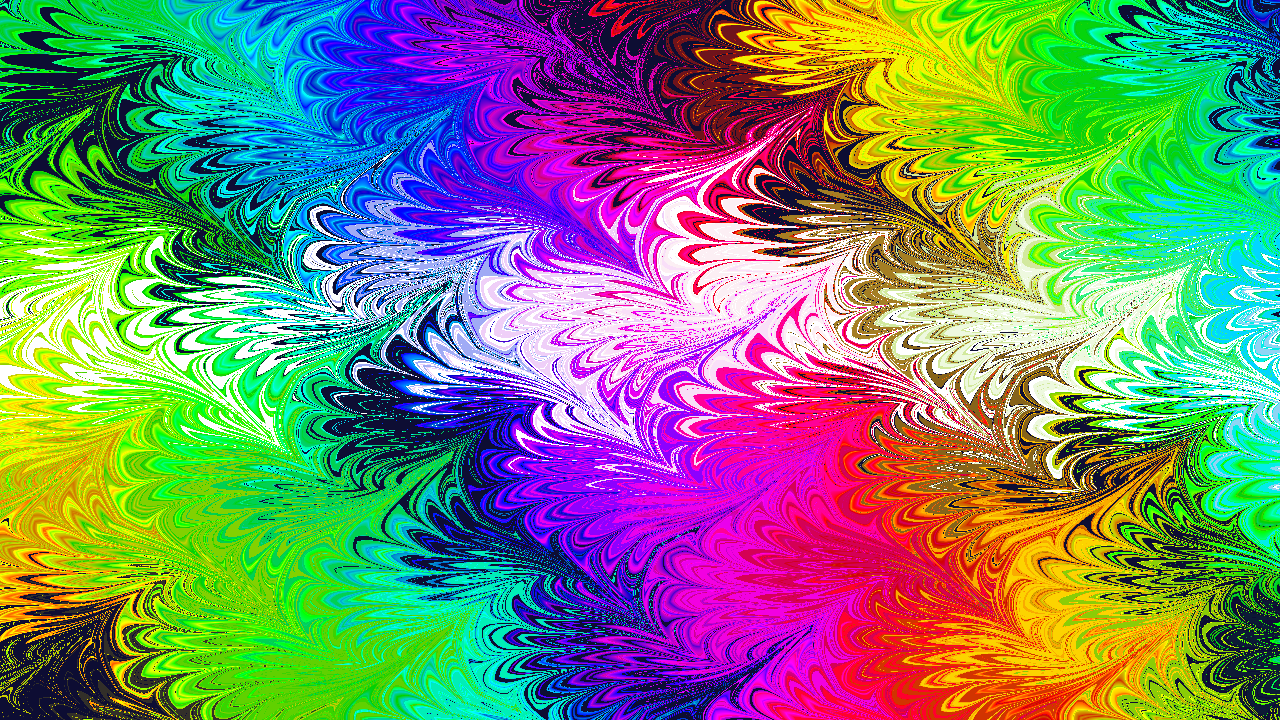
SW Marbling’s Bouquet on the harness’s colour card, rendered by the offline harness rather than captured from Resolume: 4.9 s into the harness’s music at the defaults, the last stroke just finished.
Before you rely on this: this is v0.1.1, a fix to the first release, and early days. Every tool is the closed form from Lu, Jaffer, Jin, Zhao and Mao’s “Mathematical Marbling” (2012), and an offline harness drives the plugin’s own code on an Apple Silicon Mac’s GPU and on Apple’s software renderer: a drop lands where the formula says to 2.8e-4 px, a block of the frame keeps its area through six stacked tools, and through a whole Nonpareil no pixel is a blend of two inks. Twenty-three deliberately wrong versions of the plugin and twenty-seven one-character sabotages of its code are all caught. It registers and draws in Resolume Arena 7.29.0 on a Mac and 7.27.1 on Windows, and on the Mac its Trigger and Paper buttons, the Beat trigger and every control did what the harness says they do. But that was over a test card, not a show; Onsets on Resolume’s own FFT (the default trigger) fired there with a demo drum loop playing (see Audio Input). The depths and drop sizes are choices, not measurements. Try it on a spare layer first, and shout if anything misbehaves.
This codebase was created with AI assistance, directed and reviewed by a human author.
Installing
Download the build for your platform. For macOS there’s a universal .dmg or .zip
(Apple silicon and Intel), Developer ID-signed and notarised so the bundle just loads
(the signing happens on my Mac shortly after each release is published, so a download made
in the first few minutes may need Open from the context menu once), and for Windows an
x64 installer or .zip. Put Marbling.bundle (macOS) or Marbling.dll (Windows) in
Resolume’s FFGL folder, then restart Resolume:
macOS    ~/Documents/Resolume Arena/Extra Effects/
Windows  %USERPROFILE%\Documents\Resolume Arena\Extra Effects\
Avenue uses the same layout in its own folder.
The Windows installer puts the DLL there for you, per user, with no admin rights needed. It
defaults to Arena’s folder (Avenue’s if only Avenue is installed) and lets you change it.
The Windows builds aren’t code-signed. Plugin files aren’t gated the way .exe files are,
so Resolume loads them as normal; only the installer trips SmartScreen, once: More info
→ Run anyway.
SW Marbling is in the effects browser. Drop it on a clip, a layer or the composition.
Start here
- Put a colourful clip on a layer and drop SW Marbling on it. Nothing changes yet: the bath is clean until something triggers.
- Set Trigger On to Beat. On every beat a few drops of ink fall, coloured from the clip where they land, and push the clip aside. After the drops come the strokes: a coarse comb across, back, then a fine comb along. That’s a Nonpareil.
- When the last stroke has finished, the next beat lays a fresh sheet (Auto Paper) and it all starts again.
- Try Pattern: Stone is drops only; Bouquet and French Curl add rakes and curls on top of a nonpareil.
- For your own timing, set Trigger On to Manual and press Trigger, or map it to a key or a MIDI pad. Paper clears the bath at any time.
The clip keeps playing underneath: the marbling moves the clip’s picture, and a drop holds the colour the clip had where and when it fell.
How it works, in one paragraph
Every marbler’s stroke is a map of the water onto itself that moves ink and never thins it. A drop pushes everything around it straight outward, a comb drags it along beside each tine, a curl turns it about a centre, and each of them keeps every area exactly as it was. So the picture is worked out backwards: for each pixel of the screen, SW Marbling follows the strokes back, newest first, to where that ink was before any of them, which is either a point of your clip or a drop. Nothing is blended or blurred, so the edge between two inks stays sharp however many strokes cross it. After many strokes the oldest are folded into one stored map, which is the one place the picture is resampled.
Patterns
Each trigger is the next step: first the drops, then the strokes, in the order a marbler works. The drops stop when they’ve covered about the frame’s area, or after twelve triggers. s is Tine Spacing, the fine comb; the coarse combs are 2s and 4s.
| Pattern | Also called | After the drops |
|---|---|---|
| Stone | battal (ebru), stone | nothing: drops only |
| Suminagashi | Japanese floating ink | ink and clear drops in turn at the same places; every 8th trigger a slow stir |
| Gelgit | getgel | a coarse comb (4s) along and back between its own lines; then across, the same |
| Chevron | a coarse comb along and back; a 2s comb across and back | |
| Nonpareil (default) | the gelgit, then the fine comb (s) along | |
| Bouquet | fleur-de-lis | the nonpareil, then two wide wavy rakes, their waves opposed |
| French Curl | snail | the nonpareil, then curls on a grid |
A pattern’s strokes take one trigger each: Nonpareil is 12 triggers of drops, then 5 strokes, 17 triggers in all at the defaults.
Triggers
- Trigger On: Onsets (default): drum hits, read from the audio by earshot, the fleet’s live-audio front end. It listens in four bands, 40–160 Hz (kicks), 160–640 Hz, 640–2560 Hz and 2560–8000 Hz (hats), and a hit in any of them is a trigger. Hits in different bands within 50 ms of each other count as one trigger, so a kick that fires two bands moves the pattern once. Where the audio comes from is Audio Input (below).
- Beat: every beat of Resolume’s bar (each quarter), placed inside the frame where it falls. Resolume’s tempo sets the pace.
- Manual: the Trigger button only.
The Trigger button works under every Trigger On, so you can add steps by hand to a pattern the music is driving.
Auto Paper (on by default) lays a fresh sheet on the first trigger after the pattern’s last stroke has finished, so a finished marbling is always seen whole, for at least one trigger’s interval. Triggers that come while the last stroke is still moving do nothing. Turn Auto Paper off and the recipe starts again on top of the finished pattern instead. Paper lays a fresh sheet at once, whatever is happening.
Audio Input
Only used under Onsets.
- Resolume FFT (default): Resolume’s own audio analysis, the same the “Audio” source of
any audio-reactive effect reads. It never opens a device. In Arena on a Mac, Arena’s demo drum
loop
Beat 001.wavon the layer below fired it on its hits. Which of Resolume’s audio it hears is Resolume’s Audio setting (below). Resolume’s analysis comes in 64 steps of 375 Hz; from v0.1.1 the plugin shares each step among the bands it overlaps, so the kick band (40–160 Hz) hears its part of the lowest step and fires on kicks there. In v0.1.0 it never fired on Resolume’s FFT and kicks came through the 160–640 Hz band instead, so the pattern moved then too, and about as often: on a kick the two bands fire together and count as one trigger, and with Arena’s demo loops the number of triggers changed by no more than it does from one run to the next. - System default: your computer’s default input, opened by the plugin.
- A device by name: the inputs the plugin found when Onsets was first used. The composition remembers the device’s name, not its place in the list, so it finds the same device next time even if the list has changed. A device that isn’t connected falls back to Resolume’s FFT until it comes back.
Choosing a device opens it, and on a Mac that asks you once to let Resolume use the microphone. The plugin never opens a device under Beat or Manual. Picking a device has not been tried in Resolume yet.
Resolume’s Audio setting. Resolume adds its own Audio control to Marbling, as to any
effect that reads its audio analysis, with three choices. Composition (the default) hears
every clip playing in the composition. Local hears only the clip Marbling is on: on a clip
with its own sound track, that sound; over a picture-only clip, nothing. External hears
Resolume’s own audio input (Resolume’s Preferences, under Audio), which in the Mac test heard
nothing. A clip only has sound if its file has a sound track: Resolume’s demo .mov clips are
picture only, and their sound is in the matching .wav files, so play the .wav on a layer of
its own.
The controls
Marbling
- Pattern: the recipe (above). A change takes effect from the next trigger.
- Paper: a fresh sheet, now: the clip, unmarbled.
- Auto Paper: a fresh sheet after each finished pattern (on), or the pattern again on top (off).
- Mix: the marbling over the clip, 0 to 1. At 0 the clip comes through bit for bit.
Trigger
- Trigger On: Onsets, Beat or Manual.
- Audio Input: where Onsets listens (above).
- Trigger: one trigger, now.
Drops
- Drop Size: a drop’s radius, 0.01 to 0.25 of the frame’s height (default 0.08). The default keeps about 90% of a typical clip’s colour range in the drops (measured on Resolume’s demo clips); bigger drops flatten the clip into fewer, larger colours.
- Drop Rate: drops per trigger, 1 to 8 (default 3), placed across the frame.
Comb
- Tine Spacing: the fine comb’s spacing, 0.0125 to 0.125 of the frame’s height (default 0.03). The coarse combs are two and four times it.
- Depth: how far a tine drags the ink, 0.02 to 0.6 of the frame’s height (default 0.15).
- Speed: how long a stroke takes, from 2 s down to 0.1 s (default 0.6 s). A drop grows over half that.
Drop Size, Drop Rate, Tine Spacing, Depth and Speed shape the next drops and strokes, not the ones already made: move them and the next trigger shows the change. That’s how ink behaves, and it means a moved slider seems to do nothing until something triggers.
About
The last group, About, has the plugin’s name, version, licence and maker, and buttons that open this user guide, the project page, the source on GitHub and the support page in your browser.
Alpha
Alpha is ink density. A transparent part of the clip is clear water: nothing under it ever shows, it stays clear wherever the comb takes it, and an opaque clip stays opaque at every Mix.
Patterns, flashes and keeping it safe
The stripes. The combed patterns are fine, high-contrast, regular stripes across the whole frame, which is what marbling is. The broadcast guidance on patterns (ITU-R BT.1702; Ofcom’s follows it) counts more than five light-dark pairs of stripes over a large part of the screen as potentially harmful, more so when they move. A finished Nonpareil at the defaults has dozens. To keep them gentler: a coarser Tine Spacing, Stone or Suminagashi (no combs), a lower Mix, or the effect on a smaller layer.
Flashes. Every one of Resolume’s 33 demo clips was run through the plugin at 60 fps, with the clips’ own music (or the demo stems layered and limited loud) driving Onsets, or a 128 or 200 BPM beat, and each frame was measured whole and in 25 overlapping thirds, counting a transition as a change of a tenth of full white with its darker end below 80%. Settings measured: the defaults; 8 drops a trigger; 8 drops of the largest size with the fastest strokes; that again as Stone and as Suminagashi; Suminagashi at its defaults. None went over three flashes a second (six transitions) in any second. The plugin’s own worst was two flashes a second over the whole frame (Suminagashi at its fastest, on a clip that doesn’t flash at all); the only clip to reach three a second, in a third of the frame, already did so on its own. A bright clip with fast triggers and big drops can still go further than these, so if your show needs a guarantee, check your own clips.
Performance
On the Mac it was measured on (an Apple M4 Max), at the defaults on a 120 BPM beat, about 0.3 to 0.5 ms a frame at 1080p (2 to 3% of a 60 fps frame) and 0.1 to 0.25 ms at 720p; at the most it ever traces in a frame (64 strokes and drops) about 1.2 ms at 1080p. The cost grows with how many strokes are being traced, not with how old the pattern is. The frame where old strokes are folded into the stored map was not timed on its own. Another GPU will differ, and nothing has been timed inside Resolume.
If it looks wrong
- Nothing happens. Something has to trigger. Under Onsets with Resolume FFT, check that
music is playing where Resolume’s Audio setting listens (a demo
.movclip has no sound; play its.wav), or try Beat or Manual. - I moved a slider and nothing changed. Drop Size, Drop Rate, Tine Spacing, Depth and Speed shape the next trigger’s drops and strokes. Trigger once.
- The triggers stopped doing anything. The pattern has finished and Auto Paper is waiting for the last stroke to end, or you’re at the end of a pattern with Auto Paper off and it has started again on top. Press Paper for a clean sheet.
- The drops are all one colour. A drop takes the clip’s colour where it lands. A flat or dark clip makes flat or dark drops.
- It went soft after a long run. After many strokes the oldest are folded into a stored map, and that one step resamples the picture: at the default comb about 12% of pixels move more than half a pixel at 720p, more at small sizes. A fresh sheet clears it.
- The pattern is cut off at the edge. The bath is a window onto a larger surface; ink pushed out of the frame is gone, and what comes in from beyond the edge is the clip’s mirror image.
Known limits
- Tried in Resolume on a test card only. It loads and draws in Resolume Arena 7.29.0 on a Mac and Arena 7.27.1 on Windows, the Windows one on Mesa’s software renderer, not a graphics card’s driver. Nobody has run a show through it yet.
- Onsets on Resolume’s FFT have been tried on two demo loops. In Arena on a Mac, Resolume’s
demo
Beat 001.wavandBass 001.wavon the layer below fired them, and from v0.1.1 the kick band fires there too (about five times a second onBeat 001.wav), with about as many triggers as before; no full mix has been played to it there, and a device as the Audio Input hasn’t been tried in Resolume. - Resolume’s FFT onsets are coarser than a device’s: Resolume’s analysis is refreshed about every 43 ms (in Arena 7.29.0) and isn’t calibrated, so a hit lands up to about two refreshes and a frame late. Its lowest bin holds everything from 0 to 375 Hz, so a bass note can fire the kick band as well as a kick can.
- A hit can count twice on Resolume’s FFT. When a hit’s attack reaches the upper bands one refresh before its low end does, the two can fall 50 ms apart, just outside the window that makes them one trigger, and the pattern takes two steps. The harness saw it on about four kicks in ten; v0.1.0 did the same.
- How long a finished pattern shows is one trigger’s interval at least: on fast onsets (four a second) that’s a quarter of a second. A hold control is an open question.
- The comb’s sharpness is a choice. Every comb’s wake is set by λ = spacing / 6, and that sharpness is also what makes the stored map’s resampling visible after a long run. A softer default would blur less.
- Chosen numbers. Drop Rate, Tine Spacing, Depth and Speed were chosen by eye on a test card; Drop Size was measured on Resolume’s demo clips by a measure that favours contrast. No source gives a drop’s size or a comb’s depth as a fraction of a tray.
- A drop’s colour is averaged in the clip’s own values, not in linear light, as an eyedropper would; a linear average would darken less at large sizes.
- A stroke still moving doesn’t drag a drop that falls during it. The drop lands on the water as it will be after the stroke.
- Not real ink. No feathering, no sinking, no mixing at an edge, and drops push old ink out of the frame instead of compressing a film.
- No antialiasing. Ink edges are pixel-sharp.
- Other GPUs. It has run on one Apple GPU, Apple’s software renderer and Mesa’s software renderer only.
The browser demo
marbling-demo.stoatworks-labs.com runs the plugin’s own code in your browser, compiled to WebAssembly, with the harness’s music or an audio file of yours (decoded in the page, never uploaded). It never opens a microphone. It’s a demo, not the plugin, and the page lists what it leaves out.
Links
- Project page: stoatworks-labs.com/software/marbling
- Browser demo: marbling-demo.stoatworks-labs.com
- Source: github.com/stoatworks-labs/marbling
- User guide: stoatworks-labs.com/software/marbling/guide
Reporting something
Something wrong, odd or missing? Open an issue at github.com/stoatworks-labs/marbling/issues. The plugin keeps a short log (its build, the GPU, whether its shaders compiled, how many audio inputs it found, which one it opened, and the host’s clock), which helps a lot:
macOS    ~/Library/Logs/marbling/
Windows  %LOCALAPPDATA%\marbling\logs\