

Photosensitivity warning. Xenon is a strobe. What it puts on screen flashes, and flashing light can trigger seizures in people with photosensitive epilepsy. Guidance for broadcast and the web (Ofcom’s, and WCAG’s) draws the line at three flashes a second for any flash that covers a large part of the picture. At 120 BPM, Trigger Beat is two steps a second and Half Beat four, so a big slice or Pattern All on Half Beat or faster is over that line. See Flashing, and keeping it safe before you put it in front of an audience, and warn them, as you would for any strobe.
Xenon is an FFGL effect for Resolume Arena and Avenue that turns every slice of your Advanced Output into a xenon strobe head, and fires them with a lighting desk’s chase.
Nothing in it is animated. Each head has a capacitor bank behind it, charged through a resistor and dumped through its tube when its step comes round. The chase decides which heads fire when; the bank decides how much light there is, because a head that fired a moment ago hasn’t had time to charge; and the tube decides how long the light lasts. That’s how a real strobe behaves, and it gives you the things a real rig does without anyone asking for them: a fast chase gets dimmer, a Bounce lights its middle heads weak and strong in turn, and a Build’s first head is always the weakest.
It was asked for by a viewer, CariTauGan, who wanted “zoetrope but instead of strobe on clip, it strobe on slices”: a strobe that fires slice by slice across an Advanced Output, without setting up Resolume’s own Strobe on every slice by hand.
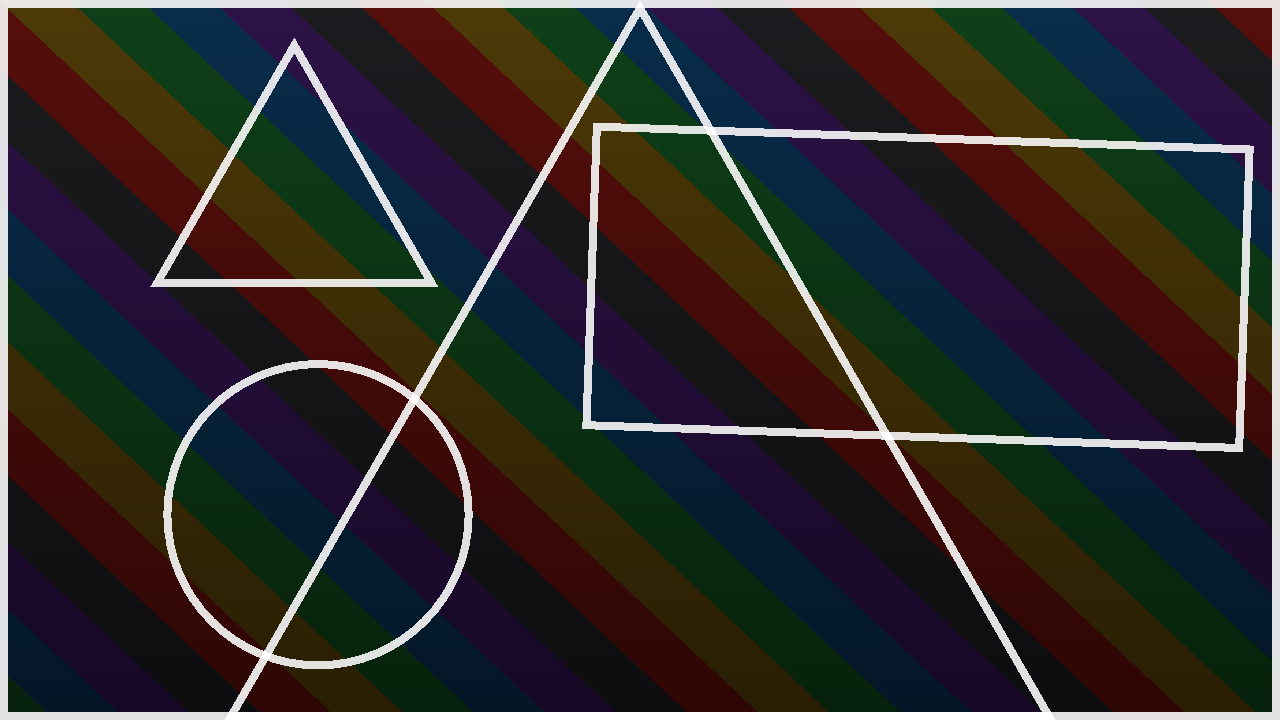
One frame from the offline harness, not captured from Resolume: an Arena 7.28.1 Advanced Output preset with a full-frame slice, a slice rotated a little, a triangular polygon and two slices seen through input masks (a triangle and a circle), with Pattern All, Look Outline and 35% room light, on the frame that catches a beat at 120 BPM.
Before you rely on this: it’s at v0.1.0, the first release, and early days. Everything below was compiled, rendered and measured offline on an Apple Silicon Mac (macOS 26), by a harness that drives the plugin’s own class in a headless GL context, at two rasters (1280×720 and 320×180) and again on Apple’s software renderer. It reads the slices of four real Arena presets, and a 7.28.1 save with a polygon and two input masks, to the corners Arena wrote (1e-12). A flash’s peak follows the bank’s (1 − e^(−Δt/RC))² to 3.5e-6 over Δt/RC from 0.13 to 4, and a flash’s light summed over every frame it lands in is its energy, whatever its length. Every head lights on the frame its beat falls in, for 24 beats of every pattern, and every pixel of every head, lit alone, is inside its slice exactly when an independent winding number in double says so. Sixteen models that are wrong on purpose and thirteen one-character changes to the shipped code are all caught, and all 19 controls the sweep can move change the picture. In Resolume Arena 7.29.0 on a Mac it loaded, read the active Advanced Output preset and drew its slices; on Windows, in Arena 7.27.1 with no GPU, every control came up as declared and a preset’s slices lit in the Composition Monitor. Onset on real music, and a full-length gig, are still to be seen. Try it on a spare layer before you put it in a show.
This codebase was created with AI assistance, directed and reviewed by a human author.
Installing
Every download carries one effect, SW Xenon (Xenon.bundle on macOS, Xenon.dll on
Windows). Drop it into Resolume’s effects folder and restart Resolume:
macOS    ~/Documents/Resolume Arena/Extra Effects/
Windows  %USERPROFILE%\Documents\Resolume Arena\Extra Effects\
Avenue uses the same layout under its own folder name. The effect then shows up in the effects browser as SW Xenon.
The macOS download is a universal build (Apple silicon and Intel), as a .dmg or a .zip. It’s
Developer ID-signed and notarised, so the bundle just loads. The Windows download is an x64
installer or a .zip. The installer offers Arena’s folder above, or Avenue’s on a machine that
only has Avenue; change it on the folder page if you use the other one. It isn’t code-signed, so
it trips SmartScreen once: More info → Run anyway. Or skip the installer, take
Xenon.dll out of the .zip and drop it into the folder by hand.
Where the slices come from
FFGL, the plugin interface Resolume uses, never tells an effect about Advanced Output. So Xenon reads the preset Arena saved, the same file Arena itself reads:
Documents/Resolume Arena/Preferences/AdvancedOutput.xmlnames the active preset;- the preset, in
Documents/Resolume Arena/Presets/Advanced Output/, holds every slice’s corners in composition pixels.
Rotated slices, polygons (straight sides and curves) and input masks are read as the shapes they are, not as their bounding boxes. Disabled slices, disabled screens and disabled masks are skipped. The same region on several screens (a full-frame slice on each of four outputs, say) is one head, not four.
Arena writes the preset only when you press Save & Close in the Advanced Output window. Editing a slice, adding a polygon or a mask, Cancel and the window’s close button write nothing. Xenon looks for a change twice a second and picks the new map up a moment after Save & Close; while you’re still editing, it shows the map you last saved. A Save & Close that changes nothing doesn’t restart the chase.
If there’s no map to read (no preset, or a preset with no slices), or you set Slices to Grid, the heads are a Rows × Columns grid over the whole picture instead. Preset File points Xenon at any other Advanced Output preset, which is also how you use a map in Avenue or on a machine whose active preset isn’t the one you want.
The log says which map it read, or why it fell back to the grid (see If it looks wrong).
Start here
- Put SW Xenon on a layer or on the composition. The defaults step through your slices one a beat, each a white flash over the clip.
- If nothing flashes, check Trigger: on Beat it follows Resolume’s tempo. Press Fire to step it by hand.
- Pick a Look: Fill lights the whole slice, Outline lights a band round its edge, and Gate shows the clip only where and when a head fires (turn Room Light down to see it).
- Pick a Pattern and a Trigger, and watch the flashes get weaker as the chase gets faster. That’s Recharge: the bank can’t keep up.
The defaults: Pattern Forward, Trigger Beat, Recharge 0.25 s, Decay 2 ms, Intensity 1, white, Look Fill, Width 12 px, Room Light 100%, Slices Map, Order As Listed, a 2 × 4 grid when there’s no map.
Recipes
Screen flash on the beat. Pattern All, Trigger Beat: every slice at once, twice a second at 120 BPM. Recharge at its default refills the bank between beats, so every flash is full.
Slice outlines chasing round the stage. Look Outline, Width 10 to 20 px, Pattern Forward or Bounce, Trigger Half Beat. Room Light at 100% keeps the clip as it is and draws the tubes over it.
The clip, strobed slice by slice. Look Gate, Room Light 0, Pattern Random. Each slice shows its part of the clip only in its own flash. Decay 20 to 50 ms gives each flash a tail.
A strobe that dies away. Pattern All, Trigger Eighth Beat, Recharge 1 to 2 s. The first flash is full and every one after it is weaker, because the banks never get time to charge. Switch Trigger back to Bar and they come back to full. Keep this one on small slices or low Intensity: it’s sixteen flashes a second at 120 BPM.
Bounce’s weak-strong. Pattern Bounce on a row of slices, Trigger Quarter Beat, Recharge about 0.3 s. The heads at the ends fire once a lap and come back full; the ones in the middle fire twice a lap, at short and long intervals in turn, so they alternate weak and strong.
Build. Pattern Build: every head up to the step’s at once, so the first head fires on every step and is always the weakest, and the last fires once a lap and is always the strongest.
From a pad. Trigger Fire Only, then map Fire to a MIDI pad or a key in Resolume: every press is one step of the pattern. Fire steps the chase in every Trigger mode, so you can also drop an extra hit into a running chase.
On the music. Trigger Onset, then pick a sound source for Audio in Resolume and set Threshold: lower fires on quieter hits, higher only on the ones that stand out.
No Advanced Output. Slices Grid, Rows and Columns up to 32 each. Order and every pattern work on the grid as they do on a map.
Flashing, and keeping it safe
Xenon flashes because that’s what it is for. People with photosensitive epilepsy can have a seizure from flashing light, and the line that broadcast guidance (Ofcom) and web guidance (WCAG 2.x) draw is no more than three flashes in any second over a large area of the picture, and no saturated red flashing at all. WCAG counts a flash as large when it covers more than a quarter of a 10° patch of the viewer’s sight, which on a typical screen is a few percent of the picture, so a slice doesn’t have to be big to count.
Some numbers, at 120 BPM:
| Trigger | steps a second | Pattern All, or any big slice |
|---|---|---|
| Bar | 0.5 | under the line |
| Beat | 2 | under the line |
| Half Beat | 4 | over |
| Quarter Beat | 8 | over |
| Eighth Beat | 16 | over |
At other tempos it scales: Beat is over three a second above 180 BPM.
What keeps a chase within the guidance:
- Fast chases on small slices. In Forward, Reverse and Random each head fires once a lap, so a head on a map of eight fires an eighth as often as the chase steps. The fast flashing then moves around the picture rather than filling it.
- Big slices and Pattern All on Beat or slower. A full-frame slice in a Forward chase of five fires once every five steps.
- Room Light up. With the clip at full brightness between flashes, a flash is a smaller change in brightness than it is over black.
- Intensity down, Decay up. A dimmer flash, or a longer, softer one, is a smaller jump.
- Avoid red flashes. Colour on saturated red flashes count at any size under WCAG.
None of this is a substitute for warning your audience. A strobe in a show is a strobe, and venues post a notice for a reason.
The Chase group
Pattern decides which heads step k lights, with N heads in their Order:
- Forward: head k, round and round.
- Reverse: the same backwards.
- Bounce: there and back, the end heads once a lap.
- Build: every head from the first up to the step’s, at once.
- Random: every head once a lap, in a shuffled order that changes each lap. Seed sets the order, so the same Seed gives the same sequence every time.
- All: every head on every step.
Trigger decides when a step happens:
- Bar, Beat, Half Beat, Quarter Beat, Eighth Beat: from Resolume’s own clock and tempo. A step lands at the moment inside the frame where its beat fell, not at the start of the next frame. If the host never moves its beat, Xenon keeps its own clock at the host’s tempo (120 BPM if it has none).
- Onset: a hit in the Audio input, louder than Threshold says.
- Fire Only: only when you press Fire.
Fire is one step now, in any Trigger mode, on the press (not the release).
Audio is the sound Onset listens to: one of Resolume’s audio sources. Threshold (0 to 1, default 0.4) is how far a hit has to stand out from what came before it. Nobody has measured what Resolume’s spectrum carries, so the default is a guess that worked on the harness’s music.
Seed (0 and up, default 1) is Random’s order.
The Strobe group
Recharge is the bank’s time constant RC, from 5 ms to 5 s (the middle of the slider is about 0.16 s; the default is 0.25 s). After a flash the bank charges as 1 − e^(−t/RC), and the next flash carries the square of that, because a capacitor’s energy goes as its voltage squared:
| time since this head last fired | flash, as a share of a full one |
|---|---|
| 0.25 RC | 5% |
| 0.5 RC | 15% |
| 1 RC | 40% |
| 2 RC | 75% |
| 3 RC | 90% |
A head that has never fired is full. A short Recharge makes every flash full; a long one makes a fast chase fade.
Decay is the tube’s time constant, from 0.2 ms to 500 ms (the middle is 10 ms; the default is 2 ms). The light dies away as e^(−t/τ). A short Decay puts each flash in one frame; a long one spreads it over several frames as a fading glow. It never changes how much light a flash gives in all, only how long it takes to give it.
Intensity (0 to 2, default 1) is a full bank’s flash. At 1 a full flash caught in one frame adds white at full strength.
Colour is the tube’s colour, one colour picker in Resolume.
The Look group
Look:
- Fill: each lit slice is a lamp in front of the clip: the clip at Room Light, plus the flash.
- Outline: the same light only within Width of the slice’s edge, inside it: a tube bent round the edge.
- Gate: the clip lit by the strobe: the clip times (Room Light plus the flash). At Room Light 0 you see the clip only in the flashes.
Edges are hard: a pixel is lit when its centre is inside the slice, as Arena crops a slice. Overlapping heads add their light, as two lamps on one wall do. Fill and Outline make a lit pixel opaque as far as its light goes; Gate keeps the clip’s alpha.
Width (1 to 100 composition pixels, the middle 10, the default 12) is Outline’s band. It’s in the composition pixels Arena shows a slice in, so 12 means 12 on a 1920 × 1080 composition at any output size. On a grid there’s no composition, and Width is output pixels.
Room Light (0 to 100%, default 100%) is how much of the clip shows between flashes.
The Slices group
Slices: Map (the Advanced Output preset, or Preset File) or Grid.
Preset File is another Advanced Output preset to read instead of the active one: Resolume’s
file picker, an .xml from Presets/Advanced Output/.
Order is the order the chase goes through the heads:
- As Listed: the order Arena’s slice list shows them, screen by screen.
- Left to Right and Top to Bottom: by each slice’s centre.
Rows and Columns (1 to 32 each, default 2 × 4) make the grid, numbered row by row from the top left.
A new map (one whose slices differ from the last) starts every head with a full bank and puts the chase back at its first step.
How it works
Each frame, on the CPU, in double precision:
- Every 0.5 s of its own clock Xenon checks the two files’ modification times, and re-reads the preset if either changed. The file is read on the render thread, never at load.
- The chase finds which steps fall inside this frame (from the host’s bar phase, an onset or a press) and which heads each one lights.
- Each head’s bank is charged for the frame, and each firing dumps it: a flash of (1 − e^(−Δt/RC))² of a full one.
- Each flash’s light is integrated over the frame’s own interval in closed form, so a frame sees exactly the light that fell in it. One number per head goes to the GPU.
Then, on the GPU, one quad per lit head (its bounding box) is drawn additively into a light buffer, and each pixel decides whether its centre is inside the head’s slice by counting how many of the slice’s edges a line from it crosses. The clip and the light are combined in linear light, and the result is turned back into sRGB.
Performance
Measured by the offline harness on a Mac (Apple silicon, M4 Max), GPU time per frame, median of 120 frames after a warm-up:
| 720p | 1080p | 4K | |
|---|---|---|---|
| the active preset’s 4 heads, the defaults | under 0.1 ms | 0.12 ms | 0.62 ms |
| 256 heads (a 16 × 16 grid), All on Eighth Beat | under 0.1 ms | 0.19 ms | 0.84 ms |
| 256 heads, Outline | under 0.1 ms | 0.18 ms | 0.83 ms |
Nothing was timed inside Resolume, and nothing was timed on Windows.
If it looks wrong
Nothing flashes. Trigger is on Onset with no audio arriving, or on Fire Only; or Intensity is 0; or the Colour is black. Press Fire to check the rest.
It’s a grid, not my slices. Xenon found no map. The log says why: no pointer file, no preset
by that name, or a preset with no enabled slices. Check that you pressed Save & Close in the
Advanced Output window (Cancel and the close button save nothing), or set Preset File. In Avenue,
the preset lives under Documents/Resolume Avenue.
My change to the slices didn’t show. Arena hasn’t written it yet: press Save & Close.
The flashes get dimmer and dimmer. That’s the banks running out of charge: the chase is faster than Recharge lets them refill. Shorten Recharge or slow the Trigger.
Some slices flash brighter than others. They fire at different intervals (Bounce, Build, Random at a lap’s join), so they’ve had different times to charge. That’s the model.
A slice is lit outside its shape, or the wrong side of a mask. Write down the slice and send the preset (see Reporting something). Xenon shows the inside of an input mask with Invert on (Arena’s default), as Arena’s editor shades it.
The effect does nothing at all. That’s what a shader that won’t compile looks like. The log has the error, and says which map was read, every re-read, and anything that was dropped:
macOS    ~/Library/Logs/xenon/xenon.YYYY-MM-DD.log
Windows  %LOCALAPPDATA%\xenon\logs\xenon.YYYY-MM-DD.log
Known limits
- Screen-level output masks and DMX fixtures are ignored. They aren’t slices of the composition. Disabled slices, screens and masks are skipped.
- Up to 256 heads and 8192 edges from a preset; anything more is dropped and logged. The grid goes to 32 × 32.
- Presets from Arena 7.27.1 and 7.28.1 are what it was checked against. Avenue’s folder is Arena’s with the name changed, and has never been seen.
- The inspector shows slider positions, not seconds or pixels. This guide gives the ranges and where the middle of each slider is.
- Resolume’s spectrum is unmeasured, so Threshold’s scale is a guess.
- Hard edges, no antialiasing: a pixel is in or out.
- Every flash on one step is the same colour. There’s no per-head colour.
- No presets and no OpenFX version.
- The browser demo is a port. It runs the plugin’s shaders unedited and a JavaScript port of its chase, banks and preset reader, which only a reader checks. It has no audio, so Onset steps only on Fire, and it takes its tempo from the page. It shows the same warning as this guide and flashes nothing until you press Start.
About
The last group, About, has the plugin’s name, version, licence and maker, and buttons that open the project page, this user guide, the source on GitHub and the support page in your browser.
Links
- Project page: stoatworks-labs.com/software/xenon
- Source: github.com/stoatworks-labs/xenon
- User guide: stoatworks-labs.com/software/xenon/guide
Reporting something
If something’s wrong, shout at
github.com/stoatworks-labs/xenon/issues. The
Advanced Output preset (the .xml from Presets/Advanced Output/), a screenshot, the Pattern,
Trigger and Look, and the log are usually enough.