

LivePremier Plus
Your switcher's own interface, with the missing panels
What it does
A LivePremier's own web interface is good at what it does and silent about the rest. It will not tell you how the VPU is allocated until a configuration fails to fit; it has no cue stack; it cannot be driven from a command line or a fader; there is nowhere to build a look except on a bus; and every numeric field wants a finished number rather than the arithmetic you did in your head to get there.
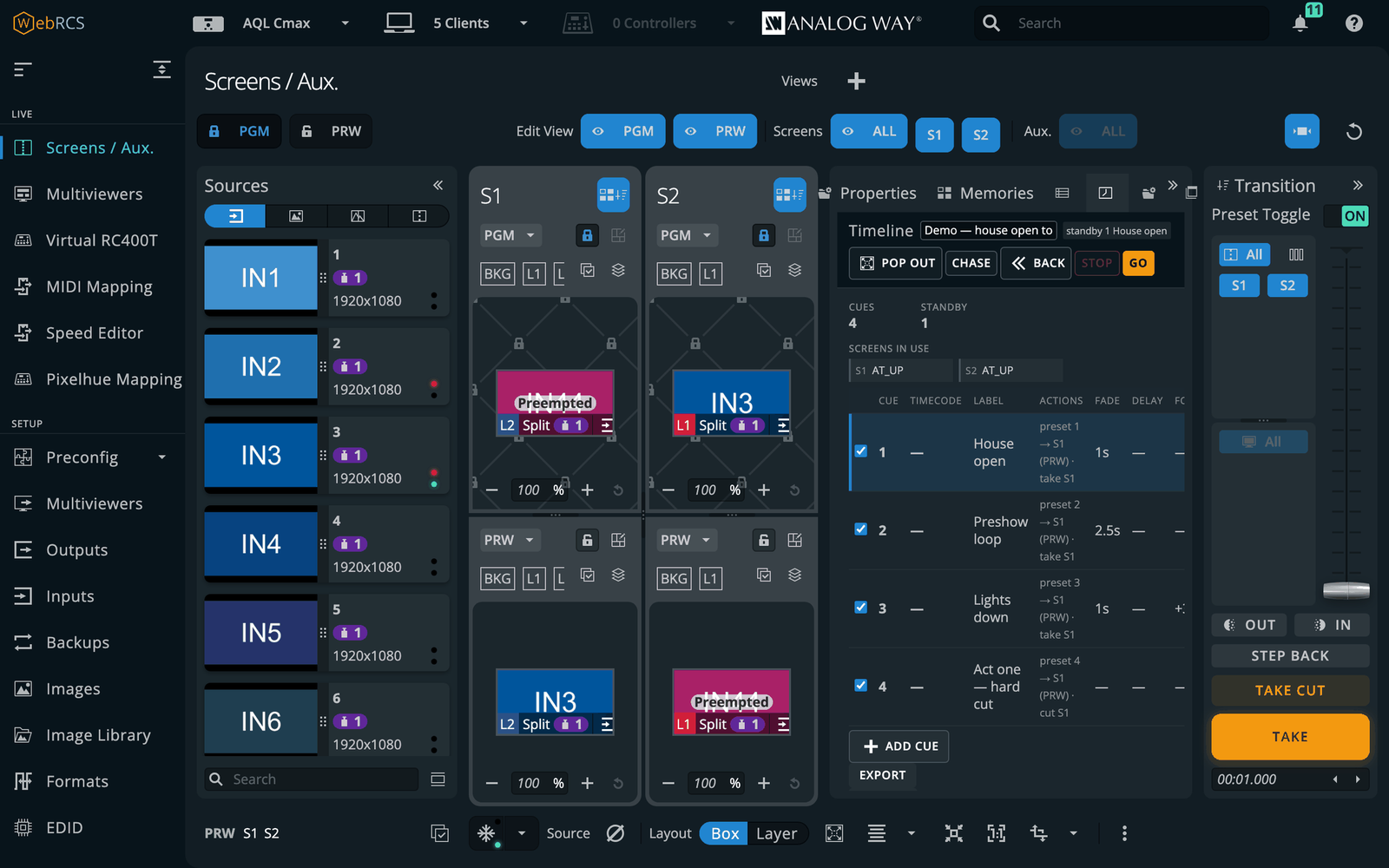
LivePremier Plus is a small local proxy. Point it at a switcher, open it in any browser, and the vendor's own Web RCS comes up with the additions already in it — drawn with the vendor's own stylesheet, riding the vendor's own connection, so the device still counts one client.
The Edit page is the Screens / Aux. layout with one row instead of two: a programmer that is on neither preview nor program. Build a look with the same sources and the same layer parameters, then save it straight into a real memory slot — the switcher’s memory bank has an import that Web RCS does not expose, so the save writes no preset buffer and fires no take. Where that route cannot reach the switcher’s disk, a second one borrows preview and puts it back exactly as it was.
The VPU Map draws the mixer allocation as a budget: what is fitted, who holds it, what is spare, and what a staged configuration would change — including the case where every difference is a link move with no property changed, which a properties-only comparison calls no change at all.
The Console is Mynah's command line: “Recall Screen 1 Memory 5”, or “R Sc 1 Me 5”. The Timeline is a theatre cue stack that advances on one GO, with per-cue fade, delay and follow times. A cue can also fire from MIDI Time Code, LTC on an audio input, or a timecode pushed from another machine. MIDI Mapping puts a control surface on the layer under your hands, with soft pickup so a fader cannot jump a live value, and OSC input lets QLab, TouchOSC or a lighting desk drive the switcher with no browser open.
The Memories panel puts master, screen and layer banks (screen, aux and master on Midra) in one searchable list, with the buffer holding each memory shown beside it, and the Layer tab exposes every one of a layer's properties from the device's own parameter catalogue — 67 on LivePremier, 57 on Midra — so a firmware that adds one grows a field for it. Both pop out to a second monitor, and a layer you name there is named in the vendor’s own lists too — the switcher itself has nowhere to keep a name.
Layer Groups drive several layers across screens as one, and a ganged group follows a source change made to any member, wherever it came from. A … on every source card sends an input to a layer or a whole group without a drag, and respects the vendor’s own PGM padlock. Matrix Routing patches the frame’s own sockets to a Blackmagic Videohub, a Lightware or a Turtle AV router, so a cue, the Console or OSC can route through it — you describe the cable and the direction works itself out. A router that has not arrived can be a placeholder of the right model: patch and route the show against it, then take it live and push the plan.
A Bitfocus Companion can be served on the same address, its button pages drawn and pressable in the app, a cue or a memory recall able to press a button, and a panel that knows which switcher you are pointed at and offers the connections that belong in the show. Pitch Compensation works out the H and V ratios a screen spanning LED walls of different pitches needs. A Pixelhue U5-series console can drive the switcher from a model of it rather than a key map, as a preview that has not yet met a real console. And the whole setup — cue stack, groups, layer names, router patch and settings — saves to one file, so a rig restores beside the switcher’s own backup rather than half of it.
The switcher’s source thumbnails are PNGs stored with next to no compression — up to 590 KB each, asked for about once a second per input. The Thumbnail relay, off until you switch it on, answers those requests itself with JPEGs of a twentieth the size, shared between every open page; the sources drawn in a screen being edited refresh up to ten times a second while the rest are held.
0.15.0 added six more. HyperDecks — and Mitti, through its HyperDeck control — are played, cued and recorded from a panel, a cue or OSC, and can follow the show the way Mitti follows an ATEM: play when their input goes on air, load the next clip when it comes off, take when a clip ends. Layer Lock keeps a layer where it is through a take, or takes one layer alone, which the switcher itself cannot do. An EDID builder puts the Otter EDID editor on the switcher's own EDID page, one EDID per custom format saved straight into the bank, and its Mosaic mode groups inputs so a Mac joins several outputs into one display. Pixelhue Mapping draws a U5 console so any key, fader or encoder can be given another job, and a DaVinci Resolve Speed Editor can drive the switcher over USB or Bluetooth. All six are proven on the simulator and emulated decks only.
0.16.0 puts the Speed Editor on a real panel. A browser page could not hold it — Chrome on macOS cannot read the panel's handshake — so USB panels now belong to a device host, a small program of the app's own that it starts, restarts if it stops, and that opens a panel only while a page is using it; CUT, the CAM keys, the wheel and the battery level are proven over USB. Audio Matrix draws the frame's audio channel matrix as a crosspoint grid, by blocks or by single channels, with mutes and signal-present dots. Remote access serves the app over Tailscale, with a real HTTPS certificate, or ZeroTier. And Multiviewer thumbnails, off by default, cut a captured multiviewer into its sources so every thumbnail on the page is a live picture.
Every one of these is a plugin. Any of them can be switched off in the app's own settings, and switched off it is gone — no menu entry, no route, no background connection. A plugin of your own is a folder in the app's data directory with a server half and a page half: it can add a sidebar page, something a cue can do, its own OSC addresses or its own section of the setup file. It stays off until you switch it on, because it runs with the same access to the switcher as the app itself.
Since 0.6.0 the Timeline, Console, Memories, Layer and Pitch Compensation work on Analog Way's other platform as well — Midra 4K (QuickVu, Pulse, Eikos, QuickMatrix) and Alta 4K (Zenith 100 / 200) — spelled for that object model by one dialect layer, with the same cue stack reading the same on either.
There is no hosted demo, and there cannot be one. The interface you see belongs to Analog Way and is served by your switcher: this project proxies it and contains no part of it. Without a device there is nothing to show. Run it from the container, a desktop build, or a checkout on the same network as the frame.
Where it stands
Released at v0.14.0. The panels render inside a real Web RCS session and the device store mirrors live, verified through this proxy against the LivePremier, Midra 4K and Alta 4K simulators. On LivePremier, every path the app emits has been checked against a physical Aquilon C and the panels opened against it in a browser, but nothing has been written to that device. On Midra 4K the port was proven on a live Pulse 4K: a test harness ran its whole write vocabulary — 39 checks, none failed — and the operator then typed the Console's own recalls, stores and deletes at the box, the first writes any of these panels have made to real hardware. What 0.9.0 added is proven on the simulators only. Layer groups and the send-to menu were driven against a preconfig staged for the one arrangement that can expose a wrong preset buffer — two screens on opposite letters — and behaved. Matrix routing reaches an external Videohub, Lightware or Turtle AV: the Videohub driver was driven end to end against a working implementation of that protocol, including the crosspoint numbering that counts from zero on the wire, but no real Videohub has been in the loop, and the Lightware and Turtle AV drivers are written from their vendors' protocol documents and have never spoken to the hardware at all. The Timeline's GO, the Layer tab and the Memories panel's buttons have written to simulators only. What 0.10.0 adds is the Edit page, and its claim was measured rather than asserted: all three of a screen's preset buffers were read off the device before and after a full editing session and came back byte-identical, a look was saved into a real memory slot with those buffers still identical, and that memory was read back into an emptied programmer. The route that writes the bank directly hands the switcher a file path the switcher resolves, so it works where both are the same machine and is unproven on a real Aquilon — which is why the second route, borrowing the preview buffer and putting it back, is built as well. What 0.11.0 adds is Companion, served inside the app: checked against a running Companion 5.0.5 and a LivePremier simulator, including its cross-origin WebSocket check, which this app re-makes rather than bypasses — a forged origin is refused. The LivePremier Plus connection it offers cannot be added until a Companion module for this app exists. What 0.12.0 adds is routing on the switcher's own input and output pages, proven against the simulator and a Videohub emulator. What 0.13.0 changes is how the app is built rather than what it does: every feature became a plugin, and each was checked against the simulator and a Videohub emulator as it moved. What 0.14.0 adds — the thumbnail relay and placeholder routers — is proven on the simulators only, the relay against a stand-in serving thumbnails the size a Pulse 4K sends; the relay is off until switched on.
Watch it running
Nothing loads from YouTube until you press play.Watch it there instead